Changes 29 October
Covering everything released since the 15 October update.
New
Review stamp history on attachments. Attachments, tables, documents and datasources now show the full review stamp with the reviewer's name, and you can expand to see earlier and invalidated stamps. Printing shows the latest stamp (the same as workpapers).
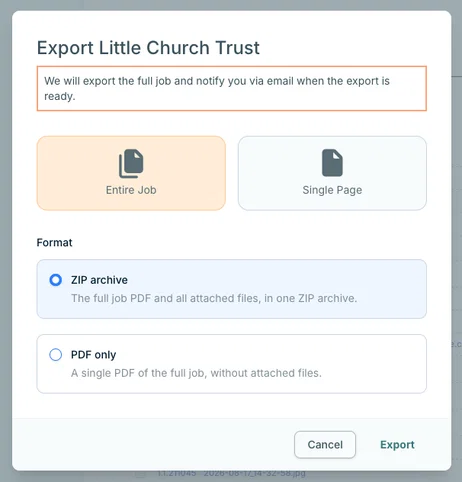
Export the whole job as a PDF without the ZIP. The export dialog now offers PDF only alongside the full archive with files, both emailed to you the same way.
All annotation types on lead schedule rows in v3 templates, not just comments, follow ups and review notes.
Compliance audits use financial statement level risks only. Assertion level risks and their labels are gone from compliance jobs, which takes a lot of noise out of the risk modules on those files.
Relevant assertions apply automatically to new rows.
N/A clears the prior year items on that step, so an N/A step doesn't carry last year's answers.
Improved
Adding an adjustment with a trial balance code that already exists now warns you instead of silently doing nothing. Spreadsheet files with macros get their own icon.
Fixed
- Attachments over 5MB wouldn't preview, we have now extended the limit to 10mb.
- Clearing or deleting trial balance rows left orphaned links and notes
- Copying and pasting numbers into adjustments
- Compliance risks showing twice
- Display of financial statement level risks, and text wrapping on risks
- The global search badge showing 0 instead of the real count
- A new totals row in the trial balance not putting the cursor in the name box
- The next step button jumping to steps marked N/A
- A control page question using the year or period variable