Changes 21 September
New Features
Rollover
Rollover is now labeled as Finalisation. Finalisation now creates a export archive and keeps the original job as a read only copy and creates a new job for the new rolled over job. Previously, Audit Assistant would destructively rollover the job and edit the year end to next year end without keeping a separate copy relying entirely on zip/pdf archives. Some UI Changes have occurred such as the action bar now displaying this job is ready to Finalise (instead of rollover) with a new finalisation screen.
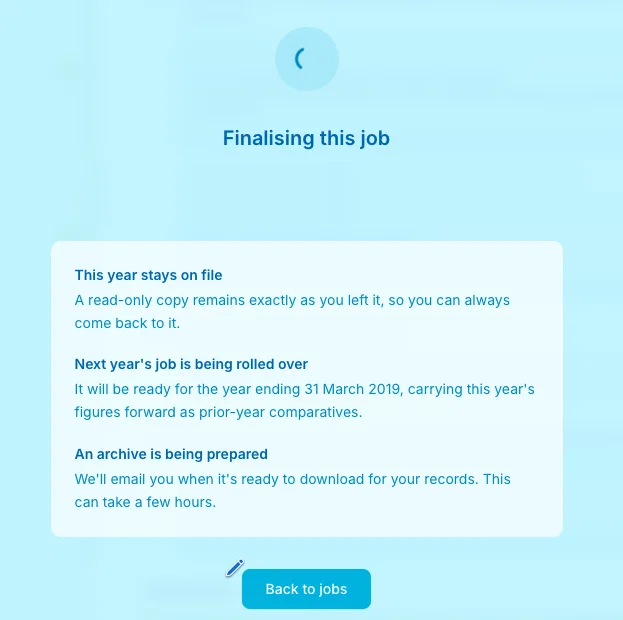
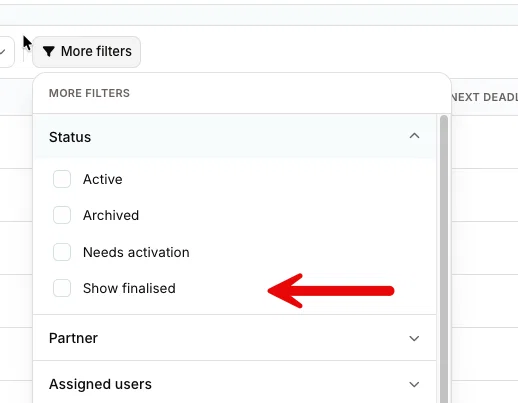
To view finalised jobs, we have added a new filter in the status filter on the jobs page - this will show read-only prior year jobs in your job search results.
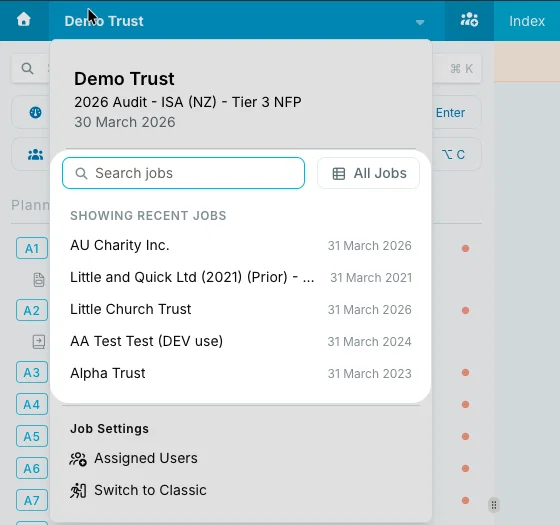
Quick job selector
Now,when you are within a job you select the job selector on the top right of the main blue toolbar, and the drop down menu contains a in-built job selector for easy switching of the past 5 jobs you last accessed - or search all jobs with search results appearing right inside the drop-down area.
Other New Features
- Reply to review notes from the summary page, instead of going back to the workpaper.
- Sharing icon on the page index for pages designed for sharing.
- Sub-pages on the All Pages index, listed alongside their parents, clickable through to where they sit.
- Drag attachments and links straight from the sidebar onto another page; sorts itself into a cross reference or linked attachment.
- Cross referencing on Yes/No answers that require further information.
Improved
- Trial balance reordering is quicker, and legacy template TB rows drag by holding, no selecting first.
- Adjusted balances link through to the journal entry on lead schedules and analytical review. Green posted, amber pending, matching the trial balance.
- Final analytical review shows comments and attachments in full.
- Unconcluding a page keeps the previous conclusion in the box.
- Recent jobs on the dashboard default to your assigned jobs.
- TB page can't be concluded with uncategorised rows.
- "Internal controls" is now "Systems and Controls".
- Last viewed on shared items. You can tell the difference between "not read" and "read and ignored".
Also: tidier contact role wrapping, spacing restored on the risks print view.
Fixed
- Saving PDF annotations wiped an attachment's other details (hard copy, link, SharePoint)
- The message sent with a share was no longer visible afterwards
- Pasting from Word double spaced text in the workpaper editor
- Opening summary pages reset the page scroll
- Partner sign-off pages can be unconcluded by a non-partner, and a
- A manager's review didn't put blue ticks on the workpaper
- A manager could conclude a partner sign-off page then be locked out of unconcluding it
- Variables not populating, plus odd behaviour in document variables
- Point forward not duplicating
- Prior year answers not auto-deleting when the current year answer differed
- Sorting by date, plus other ordering problems
- Incomplete requests not standing out on testing tables
- Attachments on a posted management point couldn't be marked reviewed
- A share link on another page of the same client didn't redirect to the new v26 version
- Transfer activation text showing on fixed plans